docker run --name ipsec-vpn-server --env-file /root/vpn.env --restart=always -v ikev2-vpn-data:/etc/ipsec.d \-v /lib/modules:/lib/modules:ro -p 500:500/udp -p 4500:4500/udp -d --privileged registry.home.tymas.cn:8000/hwdsl2/ipsec-vpn-server:latest
.env 配置文件,放在root用户根目录下 /root/vpn.env
下面高亮部分是要自己设置的
# Note: All the variables to this image are optional.
# See README for more information.
# To use, uncomment and replace with your own values.

# Define IPsec PSK, VPN username and password
# - DO NOT put "" or '' around values, or add space around =
# - DO NOT use these special characters within values: \ " '
VPN_IPSEC_PSK=aaaaaaaaaa
VPN_USER=aaaa
VPN_PASSWORD=aaaa


# Define additional VPN users
# - DO NOT put "" or '' around values, or add space around =
# - DO NOT use these special characters within values: \ " '
# - Usernames and passwords must be separated by spaces
# VPN_ADDL_USERS=additional_username_1 additional_username_2
# VPN_ADDL_PASSWORDS=additional_password_1 additional_password_2

# Use a DNS name for the VPN server
# - The DNS name must be a fully qualified domain name (FQDN)
VPN_DNS_NAME=aaa.com

# Specify a name for the first IKEv2 client
# - Use one word only, no special characters except '-' and '_'
# - The default is 'vpnclient' if not specified
# VPN_CLIENT_NAME=your_client_name

# Use alternative DNS servers
# - By default, clients are set to use Google Public DNS
# - Example below shows Cloudflare's DNS service
VPN_DNS_SRV1=223.5.5.5
VPN_DNS_SRV2=114.114.114.114

# Protect IKEv2 client config files using a password
# - By default, no password is required when importing IKEv2 client configuration
# - Uncomment if you want to protect these files using a random password
# VPN_PROTECT_CONFIG=yes
Windows 8, 10 和 11+ 用户可以自动导入 IKEv2 配置:
- 将生成的
.p12文件安全地传送到你的计算机。 - 右键单击 ikev2_config_import.cmd 并保存这个辅助脚本到与
.p12文件 相同的文件夹。 - 右键单击保存的脚本,选择 属性。单击对话框下方的 解除锁定,然后单击 确定。
- 右键单击保存的脚本,选择 以管理员身份运行 并按提示操作。
如果在连接过程中遇到错误,请参见 故障排除。
这里是上面自动化设置连接的脚本,下载不到可以把这个保存成ikev2_config_import.cmd
@echo off
:: IKEv2 Configuration Import Helper Script for Windows 8, 10 and 11
:: Copyright (C) 2022 Lin Song <linsongui@gmail.com>
:: This work is licensed under the Creative Commons Attribution-ShareAlike 3.0
:: Unported License: http://creativecommons.org/licenses/by-sa/3.0/
:: Attribution required: please include my name in any derivative and let me
:: know how you have improved it!

setlocal DisableDelayedExpansion
set "SPath=%SystemRoot%\System32"
if exist "%SystemRoot%\Sysnative\reg.exe" (set "SPath=%SystemRoot%\Sysnative")
set "Path=%SPath%;%SystemRoot%;%SPath%\Wbem;%SPath%\WindowsPowerShell\v1.0\"
set "_err====== ERROR ====="
set "_work=%~dp0"
if "%_work:~-1%"=="\" set "_work=%_work:~0,-1%"

for /f "tokens=4-5 delims=. " %%i in ('ver') do set version=%%i.%%j
if "%version%" == "10.0" goto :Check_Admin
if "%version%" == "6.3" goto :Check_Admin
if "%version%" == "6.2" goto :Check_Admin
goto :E_Win

:Check_Admin
reg query HKU\S-1-5-19 >nul 2>&1 || goto :E_Admin

where certutil >nul 2>&1
if %errorlevel% neq 0 goto :E_Cu
where powershell >nul 2>&1
if %errorlevel% neq 0 goto :E_Ps

title IKEv2 Configuration Import Helper Script
setlocal EnableDelayedExpansion
cd /d "!_work!"
@cls
echo ===================================================================
echo Welcome^^! Use this helper script to import an IKEv2 configuration
echo into a PC running Windows 8, 10 or 11.
echo For more details, see https://vpnsetup.net/ikev2
echo.
echo Before continuing, you must put the .p12 file you transferred from
echo the VPN server in the *same folder* as this script.
echo ===================================================================

set client_name_gen=
for /F "eol=| delims=" %%f in ('dir "*.p12" /A-D /B /O-D /TW 2^>nul') do (
  set "p12_latest=%%f"
  set "client_name_gen=!p12_latest:.p12=!"
  goto :Enter_Client_Name
)

:Enter_Client_Name
echo.
echo Enter the name of the IKEv2 VPN client to import.
echo Note: This is the same as the .p12 filename without extension.
set client_name=
set p12_file=
if defined client_name_gen (
  echo To accept the suggested client name, press Enter.
  set /p client_name="VPN client name: [%client_name_gen%] "
  if not defined client_name set "client_name=%client_name_gen%"
) else (
  set /p client_name="VPN client name: "
  if not defined client_name goto :Abort
)
set "client_name=%client_name:"=%"
set "client_name=%client_name: =%"
set "p12_file=%_work%\%client_name%.p12"
if not exist "!p12_file!" (
  echo.
  echo ERROR: File "!p12_file!" not found.
  echo You must put the .p12 file you transferred from the VPN server
  echo in the *same folder* as this script.
  goto :Enter_Client_Name
)

echo.
echo Enter the IP address (or DNS name) of the VPN server.
echo Note: This must exactly match the VPN server address in the output
echo of the IKEv2 helper script on your server.
set server_addr=
set /p server_addr="VPN server address: "
if not defined server_addr goto :Abort
set "server_addr=%server_addr:"=%"
set "server_addr=%server_addr: =%"

set "conn_name_gen=IKEv2 VPN %server_addr%"
powershell -command "Get-VpnConnection -Name '%conn_name_gen%'" >nul 2>&1
if !errorlevel! neq 0 (
  goto :Enter_Conn_Name
)
set "conn_name_gen=IKEv2 VPN 2 %server_addr%"
powershell -command "Get-VpnConnection -Name '%conn_name_gen%'" >nul 2>&1
if !errorlevel! neq 0 (
  goto :Enter_Conn_Name
)
set "conn_name_gen=IKEv2 VPN 3 %server_addr%"
powershell -command "Get-VpnConnection -Name '%conn_name_gen%'" >nul 2>&1
if !errorlevel! equ 0 (
  set conn_name_gen=
)

:Enter_Conn_Name
echo.
echo Provide a name for the new IKEv2 connection.
set conn_name=
if defined conn_name_gen (
  echo To accept the suggested connection name, press Enter.
  set /p conn_name="IKEv2 connection name: [%conn_name_gen%] "
  if not defined conn_name set "conn_name=%conn_name_gen%"
) else (
  set /p conn_name="IKEv2 connection name: "
  if not defined conn_name goto :Abort
)
set "conn_name=%conn_name:"=%"
powershell -command "Get-VpnConnection -Name '%conn_name%'" >nul 2>&1
if !errorlevel! equ 0 (
  echo.
  echo ERROR: A connection with this name already exists.
  goto :Enter_Conn_Name
)

echo.
echo Importing .p12 file...
certutil -f -p "" -importpfx "%p12_file%" NoExport >nul 2>&1
if !errorlevel! equ 0 goto :Create_Conn
echo When prompted, enter the password for client config files, which can be found
echo in the output of the IKEv2 helper script on your server.
:Import_P12
certutil -f -importpfx "%p12_file%" NoExport
if !errorlevel! neq 0 goto :Import_P12

:Create_Conn
echo.
echo Creating VPN connection...
powershell -command "Add-VpnConnection -ServerAddress '%server_addr%' -Name '%conn_name%' -TunnelType IKEv2 -AuthenticationMethod MachineCertificate -EncryptionLevel Required -PassThru"
if !errorlevel! neq 0 (
  echo ERROR: Could not create the IKEv2 VPN connection.
  goto :Done
)

echo Setting IPsec configuration...
powershell -command "Set-VpnConnectionIPsecConfiguration -ConnectionName '%conn_name%' -AuthenticationTransformConstants GCMAES128 -CipherTransformConstants GCMAES128 -EncryptionMethod AES256 -IntegrityCheckMethod SHA256 -PfsGroup None -DHGroup Group14 -PassThru -Force"
if !errorlevel! neq 0 (
  echo ERROR: Could not set IPsec configuration for the IKEv2 VPN connection.
  goto :Done
)

echo IKEv2 configuration successfully imported^^!
echo To connect to the VPN, click on the wireless/network icon in your system tray,
echo select the "%conn_name%" VPN entry, and click Connect.
goto :Done

:E_Admin
echo %_err%
echo This script requires administrator privileges.
echo Right-click on the script and select 'Run as administrator'.
goto :Done

:E_Win
echo %_err%
echo This script requires Windows 8, 10 or 11.
echo Windows 7 users can manually import IKEv2 configuration. See https://vpnsetup.net/ikev2
goto :Done

:E_Cu
echo %_err%
echo This script requires 'certutil', which is not detected.
goto :Done

:E_Ps
echo %_err%
echo This script requires 'powershell', which is not detected.
goto :Done

:Abort
echo.
echo Abort. No changes were made.

:Done
echo.
echo Press any key to exit.
pause >nul
goto :eof
下面是一些错误的解决办法
win10自带VPN连接失败,提示“不能建立到远程计算机的连接,你可能需要更改此连接的网络设置”处理方法(亲测有效)
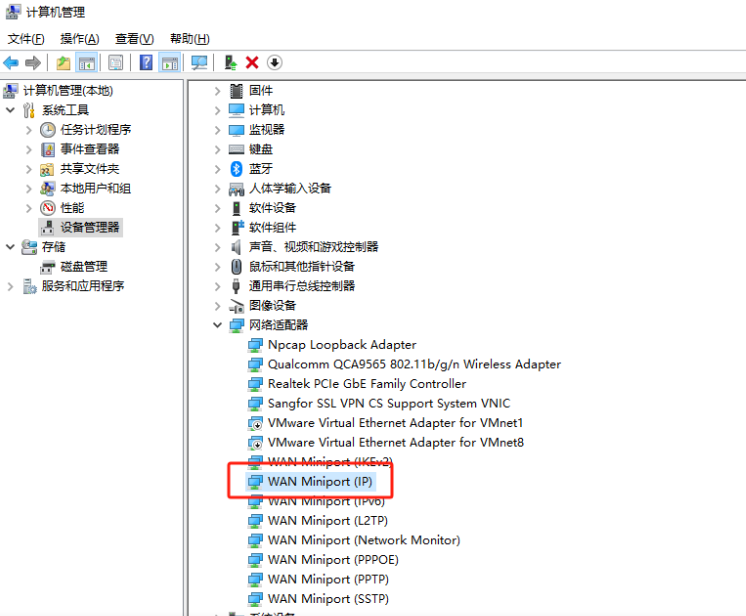
卸载网络适配器-WAN Miniport(IP),卸载完成后重启电脑,然后再连接就可以了